


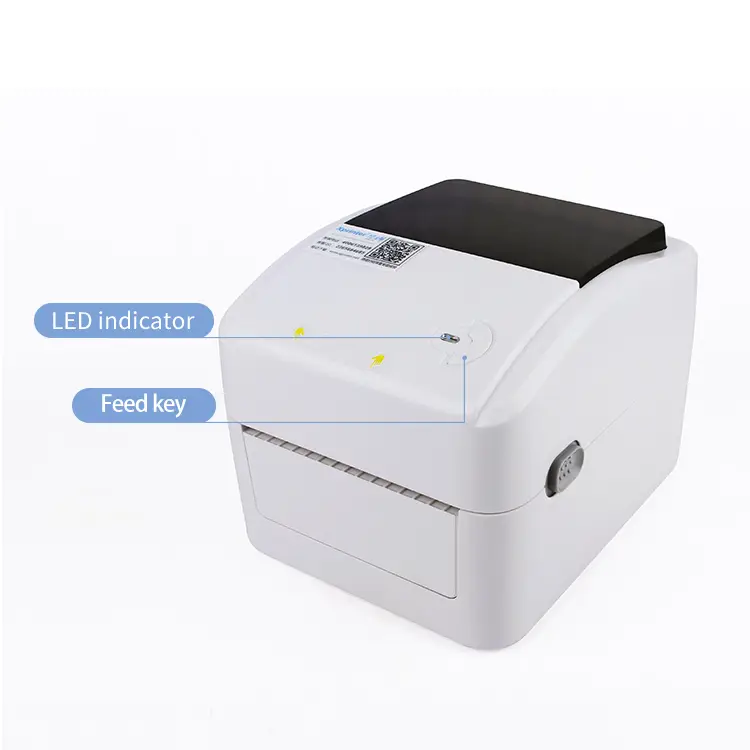
Xprinter XP-420B 203DPI Thermal Barcode Printer USB/BT/WiFi
Imagine a bustling storefront at dawn where orders fly in and the Xprinter XP-420B hums to life, popping out crisp labels like little tickets to a smooth day. With 203 DPI clarity and USB, Bluetooth, and Wi‑Fi connections, every barcode and price tag prints sharp and reads instantly wherever you place it. Sleek, dependable, and quietly efficient, it becomes the backstage hero that keeps your business moving.
5.0
model number:
420B
brand name:
Xprinter
Samples:
$69.0/piece | Min. order : 1 piece
Shipping:
Support Sea freight
Place of Origin:
China
Payments:
L/C,D/A,D/P,T/T,Western Union,MoneyGram,OA
Lead Time:
1-500(pieces):4(days),>500(pieces):To be negotiated(days)
Customization:
Customized logo (Min. Order: 500 sets),Customized packaging (Min. Order: 500 sets),Graphic customization (Min. Order: 500 sets)
design customization
Please fill out the form below to request a quote or to request more information about us. Please be sure to upload customized requirement documents or pictures, and we will get back to you as soon as possible with a response. we're ready to start working on your new project, contact us now to get started.
Please fill out the form below to request a quote or to request more information about us. please be as detailed as possible in your message, and we will get back to you as soon as possible with a response. we're ready to start working on your new project, contact us now to get started.
Paper width
108mm
Print command
ESC
Interface
USB
warranty(year)
1-Year
software development kit (sdk)
Yes
products status
Stock
private mold
Yes
Max. Resolution
200DPI
Interface Type
Usb
Color Print Speed
Donot support
black print speed
101.6mm/s
after-sales service
Call Center and on-line Technical Support
place of origin
Guangdong, China
max paper size
108 mm (4.25")
Printing Method
Ribbon printing
Style
black
Paper type
Self-adhesive/waterproof label/synthetic paper/thermal
Application
Department Stores
Product name
Barcode Label Printers
Use
Barcode Label Printer
Type
Thermal/Thermal transfer
Compact Wireless Durable Labeling
The Xprinter XP-420B 203DPI thermal barcode printer delivers fast 152 mm/s, high-precision label and barcode printing with USB/BT/WiFi connectivity, making it an essential Printing Accessories solution for retail, logistics and packaging workflows. Its compact shape and modern style optimize counter and packaging layouts, while durable build quality, precise thermal-roll feed and support for TSPL/EPL/ZPL/DPL ensure consistent, scannable labels across diverse styles. Backed by a 32-bit processor, wide operating range and manufacturer support with online technical help and free spare parts, it minimizes downtime and scales easily for custom high-volume orders.
High Precision Wireless Labeling
The Xprinter XP-420B is a 203 DPI thermal barcode printer powered by a 32-bit CPU, delivering up to 152 mm/s print speed for 108 mm (4.25") thermal roll paper with rotation options of 0°, 90°, 180° and 270°. With multi-interface connectivity (USB, Bluetooth and WiFi), broad emulation compatibility (TSPL, EPL, ZPL, DPL) and reliable label and barcode printing capabilities, it functions as essential Printing Accessories for retail, logistics and packaging workflows. Built for dependable operation in 5–40°C (storage -40–60°C), the unit combines compact structural design, large manufacturer capacity and after-sales support including call-center/online technical service and free spare parts to ensure easy integration and uptime.
203DPI Thermal Barcode Printer
The Xprinter XP-420B is a 203 DPI thermal barcode printer with USB, Bluetooth and WiFi connectivity, a 32‑bit CPU and support for TSPL, EPL, ZPL and DPL emulations for wide compatibility. It prints up to 152 mm/s on 108 mm thermal roll paper with 0°, 90°, 180° and 270° rotation options, suited for retail, logistics and label applications. As part of the Printing Accessories range it includes call center and online technical support plus free spare parts and operates reliably in typical working environments (5–40°C, 25–85% humidity).
◎ product nicety 1
◎ product nicety 2
◎ product nicety 3
Fast Reliable Versatile Connectivity
The Xprinter XP-420B 203DPI Thermal Barcode Printer (USB/BT/WiFi) reflects Xprinter’s dedication to reliable thermal printing, engineered for consistent label output and smooth integration with modern POS and inventory systems. With 203 DPI resolution, multiple connectivity options (USB, Bluetooth, WiFi), and broad format compatibility, it speeds barcode workflows and serves as essential Printing Accessories for retail, logistics, and healthcare environments. Key features and advantages include high-speed printing, easy media loading, a sturdy chassis, cross-platform driver support, and low power consumption for reduced maintenance and total cost of ownership.
Material introduction
As a member of Printing Accessories, the Xprinter XP-420B combines a robust ABS plastic outer casing with an internal steel chassis to ensure stability during high-speed 152 mm/s printing. Key wear parts are built from durable materials — a precision thermal print head with protective coating, rubberized feed rollers, and metal gear components — for consistent 203 DPI output on thermal roll paper. Electronics sit on a reliable PCB driven by a 32-bit CPU with protected USB/BT/WiFi connectors, designed for long service life and easy maintenance with available spare parts and support.
◎ ABS Metal Protection
◎ Precision Thermal Components
◎ High Speed Connectivity
FAQ
1
What types of labels and tasks is the Xprinter XP-420B best suited for?
The XP-420B is a 203 DPI thermal barcode printer designed for direct thermal label printing, making it well suited for a wide range of label tasks such as barcode labels, price tags, small shipping labels, shelf labels, inventory tags, and food/service labels. Typical application scenarios include retail (price labels and receipts), e-commerce (shipping and return labels), warehousing and logistics (inventory and picking labels), healthcare (sample and patient labels), restaurants and cafes (order tickets, food labels), and event ticketing.
2
How do I connect the XP-420B to different devices (USB, Bluetooth, Wi‑Fi)?
The printer supports USB, Bluetooth, and Wi‑Fi connectivity. General steps:
- USB: Plug the USB cable into the printer and your computer, install the provided driver, then select the printer in your OS or application.
- Bluetooth: Enable Bluetooth on your device, put the printer into pairing/discovery mode (check manual), pair from your device’s Bluetooth settings, then select the paired printer in your app.
- Wi‑Fi: Use the printer’s setup utility or a web configuration page (refer to the manual) to join your wireless network; once on the network, add the printer by IP address or auto-discovery in your print software.
Always install the official driver or mobile SDK provided by Xprinter for best compatibility and follow the manual for exact pairing/setup steps.
3
What settings and consumables give the best print quality for barcodes and text?
For crisp barcodes and legible text:
- Use the correct label media: quality direct thermal labels and compatible thermal ribbon only if the model supports transfer (check your manual—XP-420B is primarily a direct thermal printer).
- Configure 203 DPI in the driver and your labeling software to match the printer’s resolution.
- Set appropriate print darkness/contrast and print speed in the driver; increase darkness slightly if bars are faint, but reduce speed if bars smear.
- Calibrate label size and sensor type in the driver or printer utility so the printer detects gaps/black marks accurately.
- Store labels in a cool, dry place and use fresh rolls to avoid fading and smudging.
4
Can the XP-420B print different barcode types and work with common POS or inventory systems?
Yes. The printer can produce standard 1D and 2D barcodes (e.g., Code128, Code39, EAN, QR codes) when used with labeling software or POS/inventory applications that generate those barcode formats. It integrates with most systems through:
- Native drivers for Windows/macOS (check availability) or mobile SDKs for Android/iOS.
- Standard label design software (Bartender, ZebraDesigner alternatives) or the POS/inventory software’s built-in printing functions.
Before deployment, confirm your software can output the correct label size and resolution and test sample labels to validate barcode readability with your scanners.
5
What common problems might I run into and how do I troubleshoot them?
Common issues and quick fixes:
- Blank or faint prints: Increase print darkness, clean the printhead, use fresh thermal labels.
- Skewed or misaligned labels: Re-load the label roll correctly, check label guides and sensor calibration, run label calibration from the utility.
- Connectivity problems (Bluetooth/Wi‑Fi): Ensure the printer is in pairing/config mode, confirm network credentials, check firewall/router settings, restart devices.
- Paper jams: Power off, open the cover, remove jammed media gently, inspect for torn pieces, then reload.
- Application won’t print: Confirm correct driver/printer selection, correct paper size and orientation, and that the printer is online.
If issues persist, consult the user manual or contact Xprinter support with the printer model, firmware version, and a description of the problem.
6
What are best practices for deploying the XP-420B in busy retail, warehouse, or mobile scenarios?
Tips for reliable operation in production environments:
- Standardize label sizes and roll types across your operation to simplify driver settings and reduce errors.
- Keep spare media and a spare printhead/maintenance kit if you have heavy usage.
- Use labeled printer profiles in your POS/inventory software so each workstation uses the right settings.
- For mobile use, test Bluetooth pairing across your fleet of devices and consider Wi‑Fi for shared printers in fixed stations.
- Schedule routine maintenance: clean printheads and sensors, check rollers, and update firmware/drivers periodically.
- Test barcode quality with your scanners after deployment to ensure scanning reliability in real workflows.
{{item.score}} Stars
{{item.pre}}%
{{item.nickname ? (item.nickname.slice(0, 2) + '*****') : item.source === 1 ? 'mall buyer' : '--'}}
{{item.comment_time}}
Review in the {{item.country}}
{{itemAttr.params_key}}: {{itemAttr.params_value}}
Contact Us For Free Sample!
If you have any questions about our products or services, feel free to reach out to customer service team.
Welcome to Contact Us
Contact Address
Room 601, No. 6, Juyin Technology Industrial Plant, No. 1, Ganli Road, Gankeng Community, Jihua Street, Shenzhen, Guangdong, China
Copyright © 2026 Shenzhen Yichuangda Technology Co., Ltd. |Sitemap