


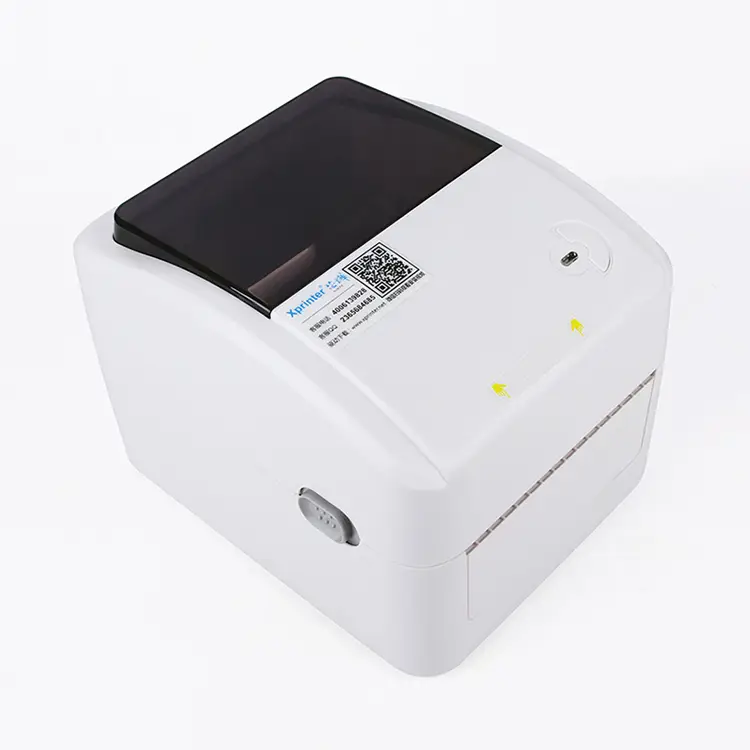
XPrinter XP-420B 203DPI Thermal Barcode Label Printer
In the morning rush of a busy shop, the XPrinter XP-420B hums on the counter, spitting out crisp tags like clockwork. With 203 DPI clarity and fast thermal printing, every barcode, price tag, and shipping label is sharp, readable, and ready to scan. Simple to set up and built to run all day, it turns chaos into order and puts a calm smile on your team's face.
5.0
brand name:
Xprinter
Shipping:
Support Sea freight
Place of Origin:
China
Payments:
L/C,D/A,D/P,T/T,Western Union,MoneyGram,OA
Lead Time:
1-500(pieces):4(days),>500(pieces):To be negotiated(days)
design customization
Please fill out the form below to request a quote or to request more information about us. Please be sure to upload customized requirement documents or pictures, and we will get back to you as soon as possible with a response. we're ready to start working on your new project, contact us now to get started.
Please fill out the form below to request a quote or to request more information about us. please be as detailed as possible in your message, and we will get back to you as soon as possible with a response. we're ready to start working on your new project, contact us now to get started.
Paper width
108mm
Print command
ESC
Interface
USB
warranty(year)
1-Year
software development kit (sdk)
Yes
products status
Stock
private mold
Yes
Max. Resolution
200DPI
Interface Type
Usb
Color Print Speed
Donot support
black print speed
101.6mm/s
after-sales service
Call Center and on-line Technical Support
place of origin
Guangdong, China
max paper size
108 mm (4.25")
Printing Method
Ribbon printing
Style
black
Paper type
Self-adhesive/waterproof label/synthetic paper/thermal
Application
Department Stores
Product name
Barcode Label Printers
Use
Barcode Label Printer
Type
Thermal/Thermal transfer
Fast Compact Reliable Labeling
This Label Printers model, the XPrinter XP-420B, delivers 203 DPI thermal printing at up to 152 mm/s for crisp, fast barcode and shipping labels that boost operational speed. Compact, square-shaped and well-packaged, it offers USB, Bluetooth and Wi‑Fi connectivity with TSPL/EPL/ZPL/DPL emulation for seamless POS and inventory integration. Robust build quality, reliable roll-feed design and factory-backed spare parts plus online technical support ensure consistent print quality and minimal downtime.
203DPI Fast Barcode Printer
The XPrinter XP-420B is a compact thermal Label Printers model delivering 203 DPI clarity and up to 152 mm/s print speed, supporting 108 mm roll width and a 32‑bit CPU for consistent, high‑quality output. With USB, Bluetooth and Wi‑Fi connectivity, multi‑language emulation (TSPL, EPL, ZPL, DPL) and 0°/90°/180°/270° rotation, it integrates easily into diverse workflows and handles varied labeling tasks. Built to operate reliably in wide temperature and humidity ranges and backed by online support, free spare parts and large‑scale customization capability, it provides scalable, cost‑effective labeling for retail, logistics and industrial use.
Reliable 203DPI Barcode Printing
The XPrinter XP-420B 203DPI Thermal Barcode Label Printer delivers crisp 203 DPI thermal prints at speeds up to 152 mm (6") per second for fast, reliable barcode and label production. As a versatile member of modern Label Printers, it supports USB, Bluetooth and Wi-Fi connectivity, accepts 108 mm (4.25") paper rolls, and is compatible with TSPL, EPL, ZPL and DPL emulations. Powered by a 32-bit CPU with multiple rotation options, it operates in 5–40°C and is backed by online technical support and spare parts for dependable after-sales service.
◎ Compact Reliable Performance
◎ Versatile Connectivity Options
◎ Precise Label Integration
Fast Accurate Reliable Labels
Built by XPrinter with years of thermal-printing expertise, the XP-420B 203DPI Thermal Barcode Label Printer reflects the brand’s focus on durable, precision-engineered solutions and practical design details for busy business environments. As a compact, fast desktop unit it produces crisp 203 DPI barcode and text output, supports USB/Serial/Ethernet connectivity, easy media loading, and reliable drivers for seamless integration and high uptime. Key features and advantages include robust construction, cross-platform compatibility, energy-efficient operation, low maintenance costs, and flexible deployment that make it a cost-effective choice among Label Printers.
Material introduction
The XPrinter XP-420B features a hard ABS plastic outer shell reinforced by an internal metal chassis to ensure durability and stable media handling for Label Printers use. Its thermal print engine uses a ceramic-substrate printhead with precision heating elements and plated contacts, paired with rubberized platen rollers for smooth, consistent feeding of thermal roll paper. Internal components include plated PCBs, reliable connectors, and standard USB/Wi‑Fi/BT modules designed for long service life and steady electrical performance.
◎ Impact-Resistant Metal
◎ Ceramic Precision Printhead
◎ Industrial-Grade Internals
FAQ
1
What types of jobs and environments is the XPrinter XP-420B 203DPI Thermal Barcode Label Printer best suited for?
The XP-420B (203 DPI) is ideal for common barcode and text labeling tasks where clarity at short-to-medium read distances is needed. Typical application scenarios include retail shelf and price labels, shipping and logistics packing slips, warehouse inventory and bin labeling, small-scale manufacturing product or part ID, healthcare specimen and patient ID labels, and event or ticketing badges. Its resolution is optimized for linear barcodes and basic 2D codes used in these everyday workflows.
2
What label materials and sizes can I use, and how do I choose the right media for my application?
Use thermal label stock suited to your printer type: direct thermal labels for short-term indoor use (shipping labels, receipts) or thermal-transfer labels with the appropriate ribbon for longer-lasting, heat- and abrasion-resistant labels. Choose a label width and gap/black-mark detection that matches the printer’s media sensor and your required print area — common widths for desktop barcode printers cover small tags up to 4-inch shipping labels. For durability, pick synthetic or coated papers with a compatible ribbon if you need resistance to moisture, chemicals, or sunlight.
3
How do I install and set up the printer for the first time?
Unpack and place the printer on a stable surface, load the label roll and any ribbon (if using thermal transfer) following the feed path marked inside the cover, and close the cover until it clicks. Connect the printer to power and to your computer or network using the interface provided on your unit (USB, serial, or Ethernet as applicable), then install the manufacturer drivers or driver package recommended for your OS. Finally, use the driver or bundled utility to calibrate media sensors and set label size, gap/black mark position, and print density so labels print centered and consistently.
4
Which barcode formats, software, and printing commands does the XP-420B support for designing labels?
The printer handles standard linear and 2D barcodes used in supply-chain and retail (e.g., Code128, Code39, EAN/UPC, QR codes) and supports common fonts and basic graphics. It works with mainstream label-design and inventory software (BarTender, NiceLabel, ZebraDesigner alternatives, or in-house systems) as long as a compatible driver or SDK is available. For specific command languages or SDKs supported by your unit (for direct control or integration), consult the XPrinter manual or download the official developer resources from the manufacturer.
5
What are common print-quality or operation issues and how can I troubleshoot them?
Common issues include faint or uneven prints (check print-head cleanliness, adjust print density/contrast, and confirm correct ribbon or media type), label misalignment or feeding errors (recalibrate sensors, verify media is seated and guides set correctly), and communication problems (confirm correct driver/port settings and cables). Also inspect for worn or damaged print heads and replace if necessary. When in doubt, power-cycle the printer, reinstall drivers, and consult the status LEDs or built-in self-test to diagnose hardware faults.
6
How do I maintain the printer for reliable everyday use and longer service life?
Regular maintenance prolongs life and ensures consistent print quality: clean the print head and platen roller with recommended isopropyl alcohol wipes on a scheduled basis or when prints degrade; keep the feed path free of adhesive residue and label debris; store spare labels and ribbons in dry, dust-free conditions; and update firmware/drivers when vendor updates address bugs or compatibility. Also avoid printing at the highest density/speed continuously unless needed, and replace consumables (labels, ribbons) before they run out to prevent head damage and jams.
{{item.score}} Stars
{{item.pre}}%
{{item.nickname ? (item.nickname.slice(0, 2) + '*****') : item.source === 1 ? 'mall buyer' : '--'}}
{{item.comment_time}}
Review in the {{item.country}}
{{itemAttr.params_key}}: {{itemAttr.params_value}}
Contact Us For Free Sample!
If you have any questions about our products or services, feel free to reach out to customer service team.
Welcome to Contact Us
Contact Address
Room 601, No. 6, Juyin Technology Industrial Plant, No. 1, Ganli Road, Gankeng Community, Jihua Street, Shenzhen, Guangdong, China
Copyright © 2026 Shenzhen Yichuangda Technology Co., Ltd. |Sitemap