


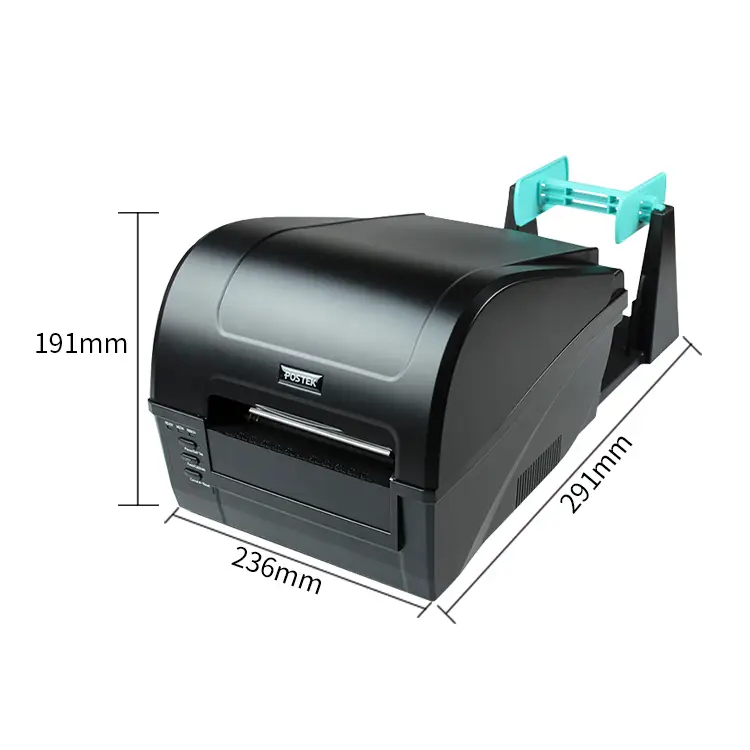
Simple Operation C168 Desktop Thermal Transfer Printer ESC
Imagine a bright morning at your packing bench: the C168 Desktop Thermal Transfer Printer ESC wakes with a single press and starts generating crisp, smudge‑free labels and barcodes in seconds. Built for simple operation and ESC‑command compatibility, its compact design and intuitive controls let you focus on orders, not settings. Quiet, reliable and professional, the C168 turns every shipping task into a polished moment of efficiency.
5.0
brand name:
postek
Samples:
$15.0/roll | Min. order : 1 roll
Shipping:
Support Sea freight
Place of Origin:
China
Payments:
L/C,D/A,D/P,T/T,Western Union,MoneyGram,OA
Lead Time:
1-500(rolls):4(days),>500(rolls):To be negotiated(days)
design customization
Please fill out the form below to request a quote or to request more information about us. Please be sure to upload customized requirement documents or pictures, and we will get back to you as soon as possible with a response. we're ready to start working on your new project, contact us now to get started.
Please fill out the form below to request a quote or to request more information about us. please be as detailed as possible in your message, and we will get back to you as soon as possible with a response. we're ready to start working on your new project, contact us now to get started.
Paper width
108mm
Print command
ESC
Interface
USB
warranty(year)
1-Year
software development kit (sdk)
Yes
products status
Stock
private mold
Yes
Max. Resolution
203DPI
Interface Type
Usb
Color Print Speed
Donot support
black print speed
160mm/s
after-sales service
Call Center and on-line Technical Support
place of origin
Guangdong, China
max paper size
108*100
Printing Method
Ribbon printing
Paper type
Self-adhesive/waterproof label/synthetic paper/thermal
Application
Label Maker, Department Stores
Product name
Barcode Label Printers
Compact Sleek Reliable Labeling
The compact black C168 desktop thermal transfer printer delivers reliable, high-volume label printing with a rigid frame and high-capacity ribbon to minimize downtime and service costs. Its versatile media handling, adjustable sensors, 203 dpi resolution and 6 ips speed support a wide range of labels and Printing Accessories—cutters, rewinders and wireless or Ethernet modules—for seamless integration into busy packaging and shipping workflows. Packaged securely for desktop use, the affordable C168 combines durable construction, precise motor-driven transmission and easy USB/serial connectivity to give businesses consistent, professional labels with minimal fuss.
Simple Desktop Thermal Transfer
The C168 desktop thermal transfer printer combines compact, affordable design with durable, high‑performance mechanics, offering direct thermal and thermal transfer modes, 203 dpi resolution, up to 6 ips speed and a 4.25″ print width for versatile label production. It handles a wide range of media and ribbons with reflective and transmissive sensors, supports built‑in fonts plus 1D/2D barcodes, includes 8 MB flash/16 MB SDRAM and multiple interfaces (USB, RS‑232), and is compatible with optional Printing Accessories such as Wi‑Fi, cutters and external label rewinders. Its rigid structure and reliable motor/transmission system minimize downtime and service costs while high‑capacity ribbon support and flexible media handling deliver efficient, high‑volume printing and easy workflow integration.
Simple C168 Thermal Transfer
The compact C168 desktop thermal transfer printer delivers dependable direct thermal and thermal transfer label printing at 203 dpi and up to 6 ips, supporting widths to 4.25″ and long label lengths for high-volume applications. Its rigid structure, reliable motor and transmission system minimize downtime and service costs, while adjustable reflective and transmissive sensors plus multiple interfaces (USB, RS-232 and optional Wi‑Fi or Ethernet) ensure flexible media handling. Compatible with a range of Printing Accessories such as cutters, external rewinders and media guides, the C168 provides an affordable, durable solution for barcode and label production.
◎ product nicety 1
◎ product nicety 2
◎ product nicety 3
Efficient, Reliable, Precise, Intuitive
Built by a brand focused on user-first labeling, the Simple Operation C168 Desktop Thermal Transfer Printer ESC blends robust manufacturing and compact design to offer dependable performance and easy daily use. It handles high-resolution thermal transfer output, ESC command sets, quick warm-up and auto-calibration, and serves as a versatile member of your Printing Accessories kit for retail, warehouse, and office workflows. Features like one-touch media loading, energy-efficient operation, adjustable label widths, USB/serial connectivity, and intuitive status indicators reduce training and maintenance while ensuring consistent, high-quality labels.
Material introduction
The C168 desktop thermal transfer printer is built with a sturdy metal and engineering‑grade polymer chassis and a reliable motor and transmission system designed to minimize downtime and service costs. Its consumable materials are optimized for durability, supporting wax, wax/resin and resin ribbons alongside self-adhesive, synthetic and thermal papers for high‑volume label production. Compact internal components, adjustable reflective and transmissive sensors, and standard interfaces allow seamless integration with Printing Accessories and peripherals such as cutters, rewinders and network modules.
◎ Durable Industrial Build
◎ Broad Media Compatibility
◎ Serviceable Integration Design
FAQ
1
What is the Simple Operation C168 Desktop Thermal Transfer Printer ESC best used for?
The C168 is a compact thermal transfer label printer designed for short- to medium-run labeling tasks. Typical application scenarios include retail price and product labels, shipping and logistics labels, inventory and asset tags, healthcare specimen and wristband labeling, and light manufacturing or packaging labels. It is optimized for durable prints when used with thermal transfer ribbons (wax, wax-resin, resin) and compatible label stocks.
2
How do I load labels and the thermal transfer ribbon correctly?
Open the top cover, place the label roll on the media spindle so labels feed from the top and under the platen roller, then pull the liner under the printhead. Install the ribbon with the ink side facing the labels (usually ribbon unwinds from the top across the printhead) and anchor the ribbon core on the supply spindle; advance it to the take-up spindle so it winds correctly. Close the cover and run a label feed/calibration from the front panel or driver to confirm correct sensing. Refer to the printer’s quick guide if you’re unsure of ribbon orientation—incorrect loading causes blank or smeared prints.
3
How do I connect the printer to my computer and install drivers?
The C168 typically supports USB and may also support parallel, serial, or network interfaces depending on the model. Install the manufacturer driver or a compatible Windows driver first, then connect the printer and let the OS detect it. If your software uses ESC commands (printer’s ESC command set), ensure you select the correct COM/USB port in your label application or configure a virtual COM port if required. For network models, assign an IP in the same subnet and use the IP in your label software.
4
My prints are faint, streaky, or misaligned — how can I fix print quality and alignment issues?
Check ribbon type and print density: switch to a darker density in the driver or lower speed to improve darkness. Clean the printhead with recommended cleaner to remove debris and ribbon residue (power off and allow the head to cool first). Ensure media and ribbon are loaded correctly and the label sensor is positioned for your media type (gap, black mark, or continuous). Also confirm you’re using the correct label stock and ribbon formulation for your substrate; incompatible ribbon can cause poor adhesion or streaking.
5
How can I control the printer from software — does it support ESC commands?
Yes, the C168 supports a standard ESC-style command set for controlling print jobs, configuration, barcodes, and graphics. Most label design and printing applications support sending ESC commands or using the driver’s built-in options; you can also send raw ESC sequences through serial/USB if your application permits. For multi-field labels, barcodes, and graphics, use your label software to generate the layout and let it translate to the printer’s command set, or consult the printer command manual for direct control.
6
What routine maintenance and troubleshooting should I perform to keep the printer reliable?
Regularly clean the printhead, platen roller, and media path to prevent print defects and jams (use the manufacturer-recommended cleaning swabs/alcohol). Replace consumables like ribbons and worn platen rollers as needed, and store labels and ribbons in a cool, dry place to avoid adhesive and ink problems. Perform sensor calibration anytime you change media type, and check for firmware/driver updates from the manufacturer if you encounter persistent communication or driver issues. For jams, power off, carefully remove media and ribbon, clear debris, then reload and re-calibrate.
{{item.score}} Stars
{{item.pre}}%
{{item.nickname ? (item.nickname.slice(0, 2) + '*****') : item.source === 1 ? 'mall buyer' : '--'}}
{{item.comment_time}}
Review in the {{item.country}}
{{itemAttr.params_key}}: {{itemAttr.params_value}}
Contact Us For Free Sample!
If you have any questions about our products or services, feel free to reach out to customer service team.
Welcome to Contact Us
Contact Address
Room 601, No. 6, Juyin Technology Industrial Plant, No. 1, Ganli Road, Gankeng Community, Jihua Street, Shenzhen, Guangdong, China
Copyright © 2026 Shenzhen Yichuangda Technology Co., Ltd. |Sitemap