


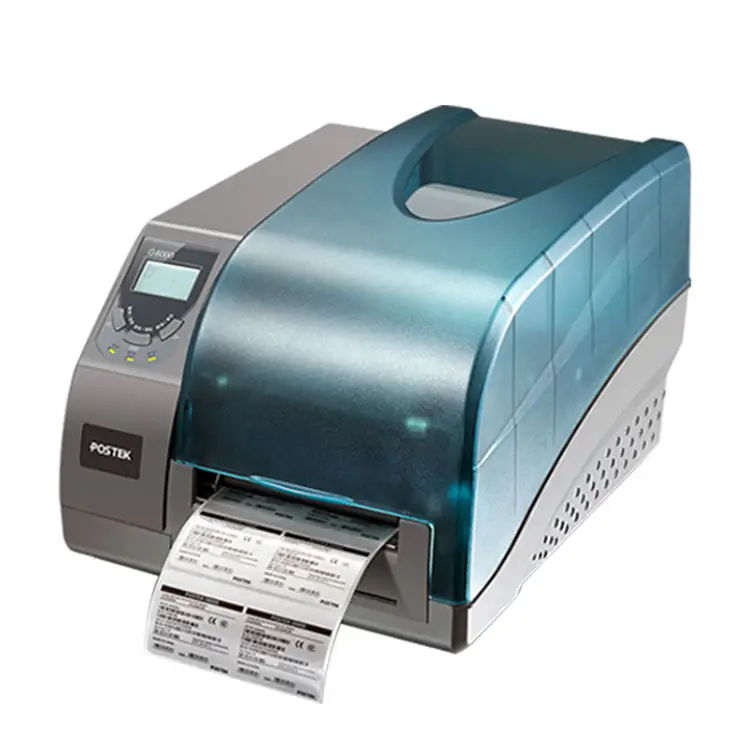
Postek G6000 600dpi USB Thermal Transfer Ribbon Printer
The Postek G6000 600dpi USB Thermal Transfer Ribbon Printer is a compact desktop label and barcode printer that produces very high‑resolution 600dpi output and connects easily via USB. Key selling points: ultra‑fine 600dpi print quality for crisp text and detailed graphics, thermal transfer printing for durable, smudge‑ and fade‑resistant labels, and simple USB setup with broad media compatibility for flexible use. Its reliable feed and build make it great for small‑to‑medium runs where detail and longevity matter (shipping, electronics, healthcare labels).
5.0
brand name:
postek
Samples:
$1099.0/roll | Min. order : 1 roll
Shipping:
Support Sea freight
Place of Origin:
China
Payments:
L/C,D/A,D/P,T/T,Western Union,MoneyGram,OA
Lead Time:
1-500(rolls):4(days),>500(rolls):To be negotiated(days)
Customization:
Customized logo (Min. Order: 500 sets),Customized packaging (Min. Order: 500 sets),Graphic customization (Min. Order: 500 sets)
design customization
Please fill out the form below to request a quote or to request more information about us. Please be sure to upload customized requirement documents or pictures, and we will get back to you as soon as possible with a response. we're ready to start working on your new project, contact us now to get started.
Please fill out the form below to request a quote or to request more information about us. please be as detailed as possible in your message, and we will get back to you as soon as possible with a response. we're ready to start working on your new project, contact us now to get started.
Paper width
108mm
Print command
ESC
Interface
USB
warranty(year)
1-Year
software development kit (sdk)
Yes
products status
Stock
private mold
Yes
Max. Resolution
300DPI
Interface Type
Usb
Color Print Speed
Donot support
black print speed
101.6mm/s
after-sales service
Call Center and on-line Technical Support
place of origin
Guangdong, China
max paper size
105.6*1000
Printing Method
Ribbon printing
Style
black
Paper type
Self-adhesive/waterproof label/synthetic paper/thermal
Application
Department Stores
Product name
Barcode Label Printers
Use
Barcode Label Printer
Type
Thermal/Thermal transfer
Reliable Compact 600dpi Printing
Label Printers that deliver crisp 600 dpi thermal transfer printing at up to 4 ips are ideal for producing durable, barcode‑grade labels for packaging, inventory, and compliance. A compact, lightweight black chassis with a one-piece metal frame and anti-static 600 dpi printhead provides industrial-quality output, easy ribbon and printhead access, and adjustable pressure for consistent results. With USB, Ethernet and serial interfaces, SDK support, and broad media compatibility (roll-feed, die-cut, tags, synthetic paper), it simplifies integration and keeps high-volume operations running 24/7.
600dpi Precision Durable Labeling
The Postek G6000 600dpi USB Thermal Transfer Ribbon Printer is a compact, industrial-grade Label Printers model offering 600 dpi thermal transfer output at up to 4 ips and a 4.16″ print width, backed by 8 MB FLASH/16 MB SDRAM and multiple interfaces (USB 2.0 host/device, RS-232, 10/100 Ethernet). It handles roll‑feed, die‑cut, continuous, fan‑fold media and tags with wax, wax/resin or resin ribbons (up to 110 mm wide and 300 m long), supports reflective/transmissive sensors, built‑in and downloadable fonts, and a full set of 1D/2D barcodes (Code 128, QR, PDF417, DataMatrix, etc.) for versatile labeling tasks. Engineered for durability and ease of use, the G6000 features an anti‑static 600 dpi printhead, one‑piece metal frame, convective heat transfer for stable 24/7 operation, adjustable printhead pressure and ribbon tension, and a unique platen roller for quick media changes and cleaning.
600dpi USB Thermal Printer
The Postek G6000 is a compact yet industrial‑grade 600 dpi thermal transfer printer that prints up to 4 ips with a 4.16″ width and 40″ max length for crisp, high‑density barcode and label output. As part of professional Label Printers, it combines a one‑piece metal frame, anti‑static printhead, convective heat transfer, adjustable printhead pressure and ribbon tension, and a unique platen roller for reliable 24/7 operation and easy maintenance. It handles roll‑feed, die‑cut, continuous and tag media, supports wax/wax‑resin/resin ribbons, reflective and transmissive sensors, multiple interfaces (USB, RS‑232, Ethernet), built‑in fonts, 1D/2D barcode formats and an SDK for seamless integration.
◎
◎
◎
Precision Durability Speed Reliability
Postek’s G6000 600dpi USB thermal transfer ribbon printer is engineered with industrial-grade components and strict quality control to deliver consistent, high-resolution output suited for professional labeling needs. As one of Postek's advanced Label Printers, it pairs a 600 dpi print head with USB connectivity, flexible media handling, and a rugged ribbon system to produce precise barcodes, fine text and durable images. Designed for ease of use and low maintenance, the G6000 minimizes downtime with simple ribbon/media loading, broad driver compatibility, and reliable performance in high-volume environments.
Material introduction
The Postek G6000 pairs a sturdy one-piece metal frame with an anti-static 600 dpi thermal transfer printhead, optimized for durable ribbon materials including wax, wax/resin, and full resin formulations. It accepts roll-feed, die-cut, continuous and synthetic label stocks from 0.08–0.20 mm thickness, supports supply rolls up to 6″ OD and ribbon rolls up to 2.75″ OD, making it compatible with common Label Printers workflows. A reinforced platen roller plus adjustable printhead pressure and ribbon tension simplify media changes and cleaning, while convective heat transfer and dual reflective/transmissive sensors ensure consistent, high-resolution output on self-adhesive and thermal papers.
◎ material introduction 1
◎ material introduction 2
◎ material introduction 3
FAQ
1
What types of labels, tags and industries are best suited for the Postek G6000 600dpi USB Thermal Transfer Ribbon Printer?
The G6000’s 600 dpi resolution makes it ideal for fine-detail jobs: small text, high-density barcodes, 2D codes and graphics. Typical uses include electronics components and PCB labels, medical and laboratory specimen labels, pharmaceutical and chemical compliance labels, jewelry and small-item tagging, asset tags, and any application requiring crisp small-font or high-density barcode printing. Because it’s a thermal transfer printer, it works well on paper, coated papers and durable synthetics (polyester, polypropylene, polyimide) when paired with the appropriate ribbon (wax, wax-resin or resin).
2
How do I set up the printer over USB and get it working with my label software?
Connect the G6000 to your computer with the supplied USB cable, power it on, and install the official Postek driver for the G6000 (choose the 600 dpi driver if prompted). In your label software (BarTender, NiceLabel, etc.) select the Postek G6000 driver and set the resolution to 600 dpi, define the correct media size and sensor type (gap, notch or black mark), and configure darkness and speed to match your media/ribbon. Calibrate sensors in the printer driver or using the printer’s control panel so the media and marks are detected reliably. If you don’t see the printer, check USB permissions, use a different USB port/cable, and ensure the driver matches your OS version.
3
Which ribbon and media combinations should I use, and how do I pick the right ribbon?
Choose the ribbon based on the media substrate and the durability required. Wax ribbons are economical and good for paper labels with short-term use. Wax-resin offers better smudge and chemical resistance on coated papers and some synthetics. Resin ribbons provide the best abrasion and chemical resistance and are the right choice for polyester and other durable synthetics. Always match ribbon width to label width, set ribbon type in driver if available, and test print for adhesion and readability (especially barcodes). If labels will be exposed to heat, chemicals, or heavy abrasion, favor resin-based ribbons.
4
What maintenance should I perform and how often to keep print quality consistent?
Regular maintenance keeps the printhead and sensors performing well. Clean the printhead and platen roller after each roll or at least daily when in heavy use, using isopropyl alcohol and lint-free swabs or cleaning pens/cards recommended for thermal printers. Remove adhesive build-up from the platen roller and clean media sensors periodically to prevent feed issues. Inspect the printhead for scratches and replace it if you see physical damage or permanent print defects. Keep the printer dust-free and store spare ribbons and labels in a cool, dry place to prevent contamination.
5
What are common print-quality or feeding problems and how do I troubleshoot them?
Common issues include faint or uneven prints (clean printhead, increase darkness setting, slow speed), banding or streaks (dirty or damaged printhead), smearing or poor scratch resistance (use a higher-grade ribbon such as wax-resin or resin), label skewing or misfeeds (check media path, adjust label guides, verify sensor calibration), ribbon not advancing (check ribbon core seating, tension, and rewinder/peel settings), and unreadable barcodes (increase resolution — ensure 600 dpi is selected — slow speed or adjust contrast/darkness). Always run a test print and check printer self-test or status pages to isolate media, ribbon, driver, or mechanical causes.
6
Can the G6000 handle high-volume printing or automation scenarios, and how do I optimize for throughput?
The G6000 can be used in moderate production environments, batch printing and integrated workflows via USB. To optimize throughput: use driver and software settings to set appropriate speed while retaining required print quality (higher speeds reduce quality), implement label design optimizations (minimize complex graphics if not needed), use continuous ribbon and roll-fed label stock to reduce roll changeovers, and consider using print job queuing from your label application. For fully automated or very high-volume operations, evaluate whether the printer’s duty cycle and medias handling meet your throughput needs and consider a heavier-duty model if necessary.
{{item.score}} Stars
{{item.pre}}%
{{item.nickname ? (item.nickname.slice(0, 2) + '*****') : item.source === 1 ? 'mall buyer' : '--'}}
{{item.comment_time}}
Review in the {{item.country}}
{{itemAttr.params_key}}: {{itemAttr.params_value}}
Contact Us For Free Sample!
If you have any questions about our products or services, feel free to reach out to customer service team.
Welcome to Contact Us
Contact Address
Room 601, No. 6, Juyin Technology Industrial Plant, No. 1, Ganli Road, Gankeng Community, Jihua Street, Shenzhen, Guangdong, China
Copyright © 2026 Shenzhen Yichuangda Technology Co., Ltd. |Sitemap