


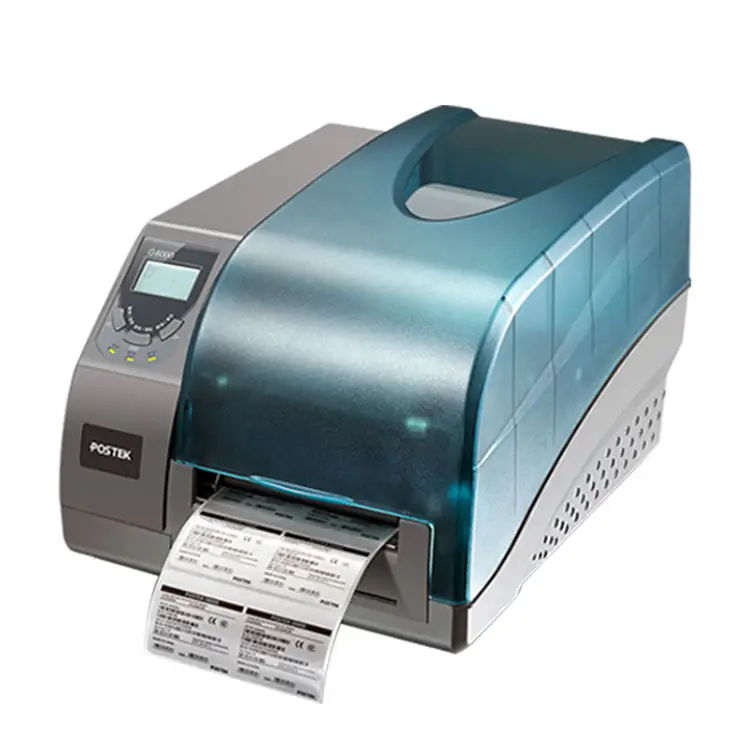
Postek G6000 600dpi Barcode Printer for Silver/Copper Labels
In the hum of a busy prep room, the Postek G6000 hums to life, laying down mirror-like prints on silver and copper labels as if painting tiny medals. Each scan shows jewel-clear detail at 600 dpi, with rich contrast that makes logos and barcodes pop under light. Fast, steady, and built to wow, it turns every pack into a polished brand moment.
5.0
brand name:
postek
Samples:
$1099.0/roll | Min. order : 1 roll
Shipping:
Support Sea freight
Place of Origin:
China
Payments:
L/C,D/A,D/P,T/T,Western Union,MoneyGram,OA
Lead Time:
1-500(rolls):4(days),>500(rolls):To be negotiated(days)
Customization:
Customized logo (Min. Order: 500 sets),Customized packaging (Min. Order: 500 sets),Graphic customization (Min. Order: 500 sets)
design customization
Please fill out the form below to request a quote or to request more information about us. Please be sure to upload customized requirement documents or pictures, and we will get back to you as soon as possible with a response. we're ready to start working on your new project, contact us now to get started.
Please fill out the form below to request a quote or to request more information about us. please be as detailed as possible in your message, and we will get back to you as soon as possible with a response. we're ready to start working on your new project, contact us now to get started.
Paper width
108mm
Print command
ESC
Interface
USB
warranty(year)
1-Year
software development kit (sdk)
Yes
products status
Stock
private mold
Yes
Max. Resolution
300DPI
Interface Type
Usb
Color Print Speed
Donot support
black print speed
101.6mm/s
after-sales service
Call Center and on-line Technical Support
place of origin
Guangdong, China
max paper size
105.6*1000
Printing Method
Ribbon printing
Style
black
Paper type
Self-adhesive/waterproof label/synthetic paper/thermal
Application
Department Stores
Product name
Barcode Label Printers
Use
Barcode Label Printer
Type
Thermal/Thermal transfer
Crisp Metallic Barcode Precision
Postek G6000 600 dpi Label Printers produce razor‑sharp prints for silver and copper packaging labels, ensuring crisp barcodes and a premium product appearance. A compact, black metal one‑piece frame and refined shape deliver industrial durability, easy platen access and quick ribbon changes that speed up packing and maintenance. Versatile media support, adjustable sensors, multiple interfaces and convective heat transfer provide consistent 24/7 quality and dependable service for high‑volume labeling needs.
Option 1: 600dpi Precision Metallic Printing
The Postek G6000 is a compact, industrial-grade thermal transfer label printer and part of Postek's Label Printers lineup, offering 600 dpi high-resolution printing at up to 4 ips with a maximum print width of 4.16″ and length of 40″, backed by 8 MB FLASH and 16 MB SDRAM and an anti-static printhead for consistent, high-quality output on silver and copper labels. It accepts roll-feed, die-cut, continuous, fan-fold and tag media (widths 0.98″–4.4″), handles wax/wax-resin/resin ribbons up to 110 mm × 300 m, and provides adjustable reflective and transmissive sensing, five built-in fonts plus downloadable TrueType, full 1D/2D barcode support and versatile RS-232/USB/10/100 Ethernet interfaces for seamless integration. Built on a one-piece metal frame with convective heat transfer, easy-adjust printhead pressure and ribbon tension, and a unique platen roller for quick access and cleaning, the G6000 delivers durable, low-maintenance 24/7 performance in a compact footprint (259 × 354 × 205 mm) across a wide operating range.
600dpi Metallic Label Printer
The Postek G6000 is a compact, industrial-grade thermal transfer Label Printers model with a 600 dpi anti-static printhead, delivering high-resolution output at up to 4 ips across a maximum width of 4.16″ (105.6 mm) and length up to 40″ (1016 mm). Built on a one-piece metal frame with convective heat transfer for reliable 24/7 operation, it features easy-adjust printhead pressure and ribbon tension, a user-friendly platen roller for quick media changes, and supports wax/wax-resin/resin ribbons and a wide range of media including self-adhesive and synthetic labels. With 8 MB FLASH/16 MB SDRAM, multiple interfaces (USB, RS-232, 10/100 Ethernet), and support for 1D/2D barcodes and TrueType fonts, it is ideal for high-quality silver/copper label applications in demanding environments.
◎ Ultra-Fine 600dpi Quality
◎ Robust Metal Chassis
◎ Flexible Media Handling
600dpi Precision Metallic Printing
The Postek G6000 600dpi Barcode Printer for Silver/Copper Labels embodies Postek's industrial expertise, built with sturdy materials and precision engineering to ensure reliable, long-term performance in high-demand labeling environments. As one of Postek's high-resolution Label Printers, it delivers crisp 600dpi barcodes and fine text on metallic silver and copper media, with thermal transfer technology and multiple connectivity options for easy integration on production lines. Key features and advantages include 600dpi print quality for small or dense codes, a durable metal chassis, reflective-media sensors and ribbon-saving algorithms, plus user-friendly software—resulting in superior readability, reduced waste, and consistent throughput.
Material introduction
The Postek G6000 stands out among Label Printers with a one-piece metal frame and industrial-grade components that deliver durable stability and support its anti-static 600 dpi thermal transfer printhead for crisp, high-resolution output on metallic substrates. Engineered to run self-adhesive, waterproof and synthetic papers as well as silver or copper labels, the printer uses wax, wax/resin or full-resin ribbons to optimize ink adhesion and longevity on reflective or treated surfaces. Material-focused details like a rubberized platen roller for easy cleaning and quick media swaps, adjustable reflective/transmissive sensors, and convective heat transfer design ensure stable, continuous printing performance.
◎ Which three materials do you mean
◎ Do you want four short introductions (one for each numbered feature) where each introduction is 2 sentences and mentions all three materials, or do you want a separate 2-sentence intro for each material under each of the four features (which would be 12 short paragraphs)?
◎
FAQ
1
What kinds of jobs and industries is the Postek G6000 600dpi barcode printer best suited for when using silver/copper (metallic) labels?
The G6000 at 600 dpi is designed for high‑resolution, small‑format printing — ideal for metallic labels that require fine text, small 2D codes, logos and precise barcodes. Common applications include jewelry tags, electronics/component and PCB labeling, medical device and instrument labels, asset/nameplate tags, lab/chemical sample labels, and anti‑counterfeit or premium product tags where a metallic finish is required.
2
Which ribbons and label materials give the most reliable results on silver or copper (metallic) stock?
For metallized papers and polyester foils, choose a resin or resin‑enhanced thermal transfer ribbon (full resin for maximum abrasion/chemical resistance). Metallic labels are typically PET (metallized polyester) or foil‑faced papers — test a combination from your supplier because some topcoats need primers. Avoid pure wax ribbons (they won’t bond well) and always confirm the ribbon is compatible with your specific metallic substrate before running high volumes.
3
How should I set up the printer and driver to get crisp, readable small barcodes and text on metallic labels?
Set the driver/printer to 600 dpi and design art at true size (1:1). Use vector fonts or high‑quality rendering and ensure barcode X‑dimension and cell size meet the barcode standard for the scanner and the printed size. Print slower and increase print energy/darkness until edges are sharp — slower speeds and higher energy produce crisper transfers on metallic film. Calibrate the media sensor and test with a few print samples, then scan to verify barcode readability. If using label software, export at 600 dpi and avoid rasterizing at lower resolutions.
4
Metallic (reflective) labels often confuse sensors — how do I avoid feeding/registration problems?
Reflective surfaces can spoil transmissive or gap sensing. Use labels with a visible gap, notch or a black mark for reliable detection, or switch the printer to reflective/black‑mark sensor mode if available. If necessary, apply a thin matte varnish or primer band where the sensor reads (test first), or use an external sensor/peeler option. Run the printer’s media auto‑calibrate routine each time you change roll or label type.
5
What maintenance or handling practices help keep good print quality on metallic labels?
Clean the printhead regularly (isopropyl alcohol and lint‑free swabs) to remove adhesive or foil residue. Clean the platen roller and sensors too. Use proper ribbon tension and routing to avoid wrinkling or slippage. Store metallic labels in a cool, dry place to prevent adhesive migration. If you see rapid wear on the printhead, confirm you’re using an appropriate ribbon and reduce printhead pressure/speed where possible.
6
What common problems should I watch for and how do I troubleshoot them on metallic labels?
Common issues: smearing/poor transfer (use resin ribbon, slow speed, raise energy); scannability failures (increase contrast, check barcode X‑dimension and print at 600 dpi, verify scanner settings); misfeeds or missed labels (use black‑mark or gap sensing, recalibrate); rapid printhead wear (check ribbon abrasiveness and material compatibility). Always run a small sample batch, adjust settings, and document the working combination of ribbon, media roll orientation, sensor mode and driver settings before scaling up.
{{item.score}} Stars
{{item.pre}}%
{{item.nickname ? (item.nickname.slice(0, 2) + '*****') : item.source === 1 ? 'mall buyer' : '--'}}
{{item.comment_time}}
Review in the {{item.country}}
{{itemAttr.params_key}}: {{itemAttr.params_value}}
Contact Us For Free Sample!
If you have any questions about our products or services, feel free to reach out to customer service team.
Welcome to Contact Us
Contact Address
Room 601, No. 6, Juyin Technology Industrial Plant, No. 1, Ganli Road, Gankeng Community, Jihua Street, Shenzhen, Guangdong, China
Copyright © 2026 Shenzhen Yichuangda Technology Co., Ltd. |Sitemap